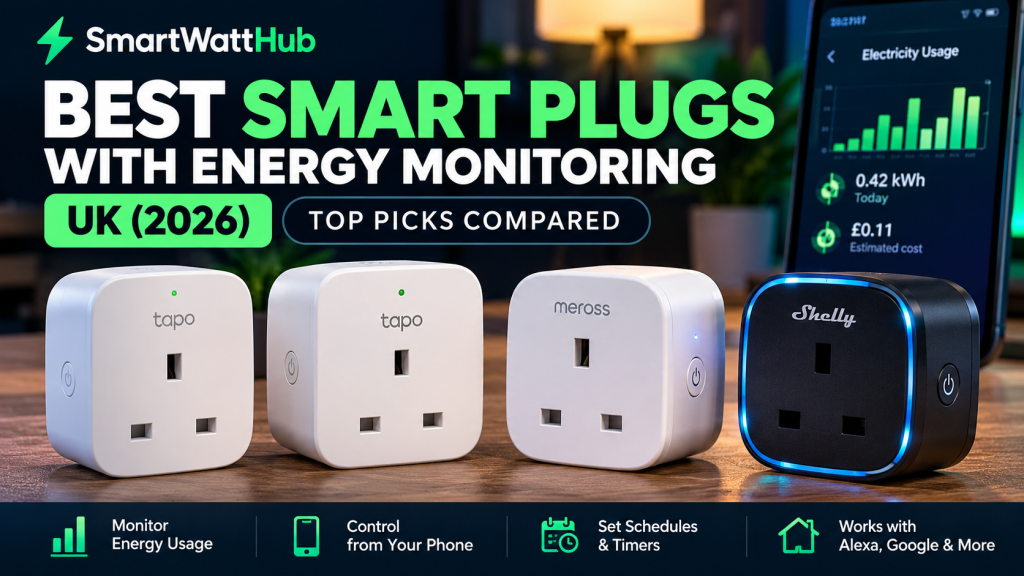
Looking for the best smart plugs with energy monitoring in the UK? Whether you’re trying to understand your electricity bills, monitor how much power your gaming PC uses, or control appliances from your phone, a smart plug with energy monitoring can be a useful addition to your home.
With electricity costs remaining an important consideration for British households, understanding exactly how much power individual appliances consume can help you make better decisions.
Unlike ordinary smart plugs, which simply turn devices on and off remotely, energy-monitoring smart plugs can measure electricity consumption and display the results through a smartphone app.
But not every smart plug offers the same features. Some are designed for simple everyday use, while others offer Matter compatibility, detailed energy statistics and advanced home automation.
At SmartWattHub, we’ve researched several smart plugs suitable for UK households, comparing their published features, compatibility and practical advantages.
Here are our recommended options to consider in 2026.
Affiliate disclosure: SmartWattHub may earn a commission from qualifying purchases made through links on this page, at no additional cost to you.
How we compared: This guide is based on manufacturer specifications and product research. These devices have not been independently hands-on tested by SmartWattHub.
Quick Comparison: Best Smart Plugs with Energy Monitoring UK
| Smart Plug | Best For | Energy Monitoring | Matter Support |
|---|---|---|---|
| TP-Link Tapo P110 | Best straightforward option | Yes | No |
| TP-Link Tapo P110M | Best for Matter compatibility | Yes | Yes |
| Meross MSS315 UK | Best alternative for Matter households | Yes | Yes |
| Shelly Plus Plug UK | Best for advanced automation | Yes | No native Matter support |
All four models have energy-monitoring capabilities, but the best choice depends on your existing smart home devices and how much control you need.
1. TP-Link Tapo P110: Best Everyday Smart Plug with Energy Monitoring
The TP-Link Tapo P110 is our first recommendation for people who want an uncomplicated smart plug with energy monitoring.
It combines electricity monitoring, remote switching, scheduling and voice assistant compatibility in a compact UK plug design.
For someone purchasing their first smart plug, the P110 offers a sensible starting point without requiring a separate smart home hub.
Key Features
- Real-time electricity usage monitoring.
- Energy consumption history through the Tapo app.
- Remote switching from a smartphone.
- Scheduled on/off times and countdown timers.
- Amazon Alexa and Google Assistant compatibility.
- 2.4GHz Wi-Fi connectivity.
- No separate hub required.
- UK version rated up to 13A, subject to appliance-specific limits.
Why Consider the Tapo P110?
One of its biggest advantages is the ability to monitor the electricity consumption of an individual appliance.
For example, you could connect a desktop computer, television or suitable household appliance and use the Tapo app to understand its energy consumption.
The scheduling feature is useful too. If you regularly leave a desk lamp switched on, you can set it to turn off automatically at a particular time.
The P110 also supports remote control, meaning you can switch connected devices on or off while away from home, provided the plug remains connected.
What Could Be Better?
The main limitation is that the P110 does not offer native Matter support.
If you’re building a smart home around Apple Home or want Matter-based compatibility across several platforms, the P110M may be a better choice.
It also requires a compatible 2.4GHz Wi-Fi network.
Pros
- Simple smart-home functionality.
- Energy monitoring included.
- No additional hub required.
- Scheduling and remote control.
- Suitable for first-time smart plug buyers.
Cons
- No native Matter compatibility.
- Uses 2.4GHz Wi-Fi.
- Not intended for outdoor use.
- Appliance compatibility and electrical limits must be checked.
Our verdict: The TP-Link Tapo P110 is an excellent starting point for UK buyers who want to monitor electricity usage without building a complicated smart home system.
2. TP-Link Tapo P110M: Best Smart Plug for Matter Compatibility
The TP-Link Tapo P110M builds on the functionality of the P110 by adding Matter compatibility.
Matter is a smart home connectivity standard designed to help compatible devices work across different ecosystems.
This makes the P110M particularly interesting for households using a combination of Amazon Alexa, Google Home, Apple Home and other Matter-compatible systems.
Key Features
- Built-in electricity monitoring.
- Matter-certified connectivity.
- Remote switching and scheduling.
- Amazon Alexa, Google Assistant and Apple Home compatibility.
- Energy cost estimates through the Tapo app.
- Compact UK plug design.
- Maximum rated current of 13A.
- 2.4GHz Wi-Fi connectivity.
Why Consider the Tapo P110M?
The biggest reason to choose the P110M over the standard P110 is its wider smart-home integration.
If you already use Apple Home or plan to build a Matter-compatible smart home, the additional connectivity can make it a more flexible purchase.
The Tapo app also allows users to enter their electricity tariff and view estimated running costs for connected devices.
That can be particularly useful when comparing the electricity consumption of different appliances.
For example, you could monitor how much energy a television consumes over several evenings or investigate the running costs of a computer setup.
Important Matter Limitation
Although the P110M supports Matter, TP-Link’s published documentation states that its energy-monitoring feature is not yet available through Matter itself.
You should therefore expect to use the Tapo app for detailed energy information unless compatibility changes through future updates.
Certain Matter integrations may also require a compatible controller or hub.
Pros
- Matter-certified.
- Supports several major smart-home ecosystems.
- Detailed energy monitoring through the Tapo app.
- Electricity cost estimates.
- Scheduling and remote control.
Cons
- Energy monitoring is not universally exposed through Matter.
- Certain smart-home integrations require additional equipment.
- May be unnecessary if you only need basic plug control.
Our verdict: The TP-Link Tapo P110M is our preferred option for buyers who want energy monitoring alongside wider smart-home compatibility.
3. Meross MSS315 UK: Best Matter-Compatible Alternative
The Meross MSS315 UK is another smart plug worth considering if you want energy monitoring and Matter support.
It offers smartphone control, electricity usage information and integration with compatible smart-home platforms.
For households already using Meross products, it may be a particularly convenient option.
Key Features
- Real-time energy monitoring.
- Historical electricity consumption information.
- Matter compatibility.
- Remote control and smart-home automation.
- 2.4GHz Wi-Fi connectivity.
- UK version rated up to 13A.
- Compact plug design.
- Integration with compatible smart-home platforms.
Why Consider the Meross MSS315?
The Meross MSS315 offers two features that make it particularly useful: energy tracking and Matter interoperability.
Through the Meross app, users can access information about the electricity consumed by connected appliances.
This allows you to investigate which devices are using more electricity than expected.
Matter support also means the plug can be incorporated into compatible smart-home systems.
For example, a household using Apple Home alongside other smart-home products may appreciate the flexibility.
What Could Be Better?
As with other Matter devices, compatibility depends on your chosen ecosystem and its available features.
You should check whether energy-monitoring information is accessible through your preferred smart-home platform or only through the manufacturer’s app.
Some Matter setups also require a compatible controller.
Pros
- Matter compatibility.
- Energy monitoring and historical usage data.
- Compact UK design.
- Multiple smart-home integration possibilities.
- Suitable for households already using Meross products.
Cons
- Requires compatible Wi-Fi.
- Certain integrations need additional hardware.
- Energy data availability can differ between apps and platforms.
Our verdict: The Meross MSS315 UK is a strong alternative to the Tapo P110M, particularly for people interested in Matter-enabled home automation.
4. Shelly Plus Plug UK: Best for Advanced Energy Monitoring and Automation
The Shelly Plus Plug UK is designed for users who want more than basic remote switching.
It combines electricity monitoring with advanced automation capabilities, including local control, an embedded web interface and support for integrations such as MQTT.
For technology enthusiasts and people building more advanced home automation systems, this makes it particularly interesting.
Key Features
- Power and energy monitoring.
- Remote and local control.
- Wi-Fi and Bluetooth connectivity.
- Embedded web interface.
- MQTT support and scripting capabilities.
- Custom schedules and automation.
- Overheating and electrical protection features.
- UK 13A plug design.
Why Consider the Shelly Plus Plug UK?
Unlike many entry-level smart plugs, the Shelly Plus Plug UK provides additional options for integrating electricity monitoring into a wider automation setup.
It can operate independently on a local Wi-Fi network and offers functionality that may appeal to people using Home Assistant or other advanced smart-home systems.
For example, users could incorporate electricity measurements into automation rules or use schedules to control connected equipment.
Its embedded web interface also offers an alternative way to access and configure the device.
What Could Be Better?
The additional capabilities may be unnecessary for someone who simply wants to switch a lamp on and off.
Although everyday functions can be straightforward, making full use of its automation features requires more technical knowledge.
It is therefore better suited to enthusiasts than people who want the simplest possible setup.
Pros
- Advanced energy-monitoring capabilities.
- Local network functionality.
- Flexible automation and integration options.
- Embedded web interface.
- No separate hub required for standalone operation.
Cons
- More technical features than some users need.
- No native Matter support on this model.
- Advanced configuration requires additional knowledge.
Our verdict: The Shelly Plus Plug UK is our preferred choice for technically confident buyers interested in advanced electricity monitoring and home automation.
What Is a Smart Plug with Energy Monitoring?
A smart plug is a device that fits between your wall socket and an electrical appliance.
An ordinary smart plug allows you to switch the connected appliance on and off using an app, timer or compatible voice assistant.
A smart plug with energy monitoring goes further by measuring electricity consumption.
Depending on the model, it may display:
- Watts (W): The power an appliance is using at a particular moment.
- Kilowatt-hours (kWh): The amount of electricity consumed over time.
- Daily consumption: Electricity used during a particular day.
- Historical consumption: Usage information collected over previous days or weeks.
- Estimated electricity cost: An approximation based on the tariff you enter.
This information can help identify appliances that consume significant amounts of electricity or remain powered unnecessarily.
Can Smart Plugs Actually Reduce Electricity Bills?
Smart plugs do not automatically make connected appliances more energy-efficient.
Their main advantage is providing information and control.
For example, an energy-monitoring plug might reveal that a particular device consumes more electricity than you expected.
You can then decide whether to use it less frequently, adjust its settings or switch it off when it is not required.
Scheduling can also help prevent suitable appliances from running unnecessarily.
However, smart plugs consume a small amount of electricity themselves, and potential savings depend on the appliance and how you use it.
A smart plug is therefore best viewed as an energy-management tool rather than a guaranteed way to reduce your bills.
How to Calculate the Running Cost of an Appliance
Understanding electricity costs is easier than it might first appear.
The basic calculation is:
Power in watts ÷ 1,000 × hours used × electricity price per kWh
For example, imagine a computer setup that draws an average of 200 watts while being used.
If you use it for five hours every day:
200 ÷ 1,000 × 5 = 1 kWh per day.
At an illustrative electricity rate of 25p per kWh, that would cost approximately:
- 25p per day
- £7.50 over 30 days
- £91.25 over 365 days
These figures are examples rather than measurements of a particular computer. Actual electricity consumption varies depending on the components, workload and connected equipment.
Your electricity tariff may also differ.
Smart plugs can help by measuring actual consumption rather than relying entirely on estimated power requirements.
What to Look for When Buying a Smart Plug in the UK
Before choosing an energy-monitoring smart plug, there are several important features to consider.
1. Energy Monitoring
Not every smart plug measures electricity consumption.
Some cheaper models offer only remote switching and timers.
If your main goal is to understand running costs, make sure the product explicitly supports energy monitoring.
2. UK Plug Compatibility
Always choose a model designed for UK Type G sockets.
Avoid relying on travel adapters or purchasing a European model without checking electrical compatibility.
3. Maximum Electrical Load
Smart plugs have maximum current and power ratings.
Many UK models are rated up to 13A, but that does not mean every 13A appliance is suitable.
Some manufacturers impose additional restrictions on heaters, motors, compressors and appliances with high starting currents.
Always follow the manufacturer’s instructions and never exceed the specified limits.
4. Wi-Fi Compatibility
Many smart plugs operate using 2.4GHz Wi-Fi.
If your home router uses both 2.4GHz and 5GHz networks, check that the plug can connect to the appropriate network.
5. Smart-Home Compatibility
If you use Alexa, Google Home, Apple Home or Home Assistant, check compatibility before purchasing.
Matter support can be useful, but it does not guarantee that every feature will work through every platform.
6. App Features
Consider whether the companion app provides the information you actually need.
Useful features include historical energy charts, electricity cost estimates, scheduling and automatic switching.
7. Safety and Manufacturer Support
Choose products with appropriate UK electrical compliance information, clear safety instructions and reliable manufacturer support.
Electrical products are not an area where saving a few pounds is worth taking unnecessary risks.
Which Appliances Should You Monitor?
Smart plugs with energy monitoring can be useful for understanding the electricity consumption of many household devices.
Desktop Computers and Gaming PCs
Gaming computers can consume very different amounts of electricity depending on whether they’re idle, browsing the internet or running demanding games.
An energy-monitoring plug can help you understand the consumption of your setup, provided the connected load remains within the manufacturer’s permitted limits.
Televisions and Entertainment Equipment
A smart plug can help measure the energy used by a television or entertainment setup during normal use and standby.
However, cutting power completely may interfere with updates, recordings or other background functions on certain devices.
Desk Lamps and Home Office Equipment
Lighting and suitable desk accessories are useful examples of devices that may benefit from both energy monitoring and scheduled switching.
Household Appliances
Some household appliances can be monitored, but compatibility must be checked carefully.
Do not assume that smart plugs are suitable for high-powered heaters, refrigerators, washing machines or other motor-driven appliances.
The electrical rating, startup current and manufacturer’s restrictions all matter.
Frequently Asked Questions
What is the best smart plug with energy monitoring in the UK?
For straightforward everyday use, the TP-Link Tapo P110 is our recommended starting point based on its published features.
If you want Matter compatibility, consider the TP-Link Tapo P110M or Meross MSS315 UK.
For advanced automation, the Shelly Plus Plug UK offers more technical capabilities.
Do smart plugs work without the internet?
Some smart plugs support local control, but the available functionality depends on the model.
Cloud-based remote access, voice assistants and certain integrations may require an internet connection.
The Shelly Plus Plug UK offers local network functionality, while other models have different requirements.
Can a smart plug tell me how much electricity my PC uses?
Yes, an energy-monitoring smart plug can measure the electricity drawn through the plug, provided your equipment is compatible and within its electrical limits.
This can help you estimate the running cost of your PC setup.
Do smart plugs need a hub?
Not always.
The TP-Link Tapo P110 and Shelly Plus Plug UK can operate without a separate hub for their basic functionality.
Matter integrations on compatible devices may require additional controllers or hubs depending on the platform.
Can smart plugs work with Alexa?
Yes, many models support Amazon Alexa, including the products discussed in this guide.
Always check the exact model and integration requirements before purchasing.
Are energy-monitoring smart plugs accurate?
They can provide useful estimates and measurements of household electricity consumption, but accuracy varies between models and operating conditions.
They should not be treated as replacements for certified billing meters.
Can I use a smart plug with an electric heater?
Only when the manufacturer explicitly permits the particular heater and its electrical load.
High-power appliances require special care. Never exceed the rated limits or use a smart plug to bypass an appliance’s safety controls.
Final Verdict: Which Smart Plug Should You Buy?
Choosing the best smart plug with energy monitoring depends on what you want to achieve.
For most people starting with smart-home technology, the TP-Link Tapo P110 is a practical choice. It offers electricity monitoring, scheduling, remote control and voice assistant compatibility without requiring a separate hub.
If you want wider smart-home compatibility, the TP-Link Tapo P110M is worth considering thanks to its Matter certification.
The Meross MSS315 UK is another option for Matter-based households, while the Shelly Plus Plug UK is better suited to people interested in advanced automation and detailed device control.
Ultimately, the most useful smart plug is one that works reliably with your existing equipment and provides the energy information you need.
Whether you’re monitoring a gaming PC, investigating appliance running costs or building a smarter home, choosing the right energy-monitoring plug can help you understand where your electricity is going.
SmartWattHub’s recommendation: Start with the TP-Link Tapo P110 for straightforward monitoring, or consider the TP-Link Tapo P110M if Matter compatibility is important to your setup.
SmartWattHub | Smart Home Reviews, Electrical Gadgets & Energy-Saving Guides for UK Homes.
Some links on SmartWattHub may be affiliate links. We may earn a commission on qualifying purchases at no extra cost to you. Recommendations should always be based on research or genuine testing.
Leave a Reply